Adaptive Bitrate Streaming: A Technical Deep Dive
Earlier, watching videos on YouTube meant a long buffer before anything played, and if your connection was bad, good luck. That's not really the case anymore. Videos often start at a lower quality and quietly shift up to a better one, and stalling is far less common. A small relief.
The core problem back then was that a video was encoded at just one fixed quality — there was no option to switch. The player would download and play in order, but if your network was slower than what that fixed bitrate needed, playback would catch up to the download and stall right there, waiting for more data before it could continue. That stall is the buffering screen everyone remembers. There was no lower-quality fallback to drop to, so you were stuck watching it.
Now the server keeps multiple versions of the same video at different qualities, cut into small chunks, so the player can pick a lighter chunk when the network is bad instead of just stalling. If the network goes up and down, the player adapts to those conditions and degrades or upgrades quality accordingly.
Roughly, step by step:
- We take a video and create multiple versions of it. If the raw video is 1080p, we also produce 720p, 480p, and 360p versions.
- Each version is then chunked into several small clips.
Now we have small chunks of a single video available in different resolutions. That gives the player the power to choose a lower or higher version based on network conditions, so the user doesn't hit a buffering screen. It comes with a trade-off, though: mid-playback the quality might drop, but playback itself doesn't stop. Every solution has a trade-off, and this one trades buffering for lower quality.
High-Level Architecture
Before going deeper into the architecture, a few terms that come up throughout:
Encoding is the process of taking a raw video recorded by a camera and compressing it into a format that can be stored and streamed efficiently. Raw video is huge — a 1-hour 4K video recorded in a raw format like ProRes RAW or CinemaDNG can easily be hundreds of gigabytes. Streaming a file that large would be impractical. During encoding, the video is compressed into a codec such as H.264 (AVC) or H.265 (HEVC), which significantly reduces file size while keeping acceptable visual quality. We also choose a bitrate — the amount of video data transmitted per second, usually measured in Mbps.
For example, a 1-hour 1080p video encoded at 8 Mbps might come out to roughly 3.6 GB. Encode it at 4 Mbps and the file shrinks, but some visual quality is sacrificed. Encode it at 15 Mbps and you preserve more detail but need significantly more bandwidth to stream it. Encoding is always a balance between quality, file size, and bandwidth.
Once we have the original encoded video, we perform transcoding — creating multiple encoded versions of the same video at different qualities such as 1080p, 720p, and 480p. Each quality version is a rendition. The full set of renditions, lowest to highest, is together called the encoding ladder. Think of it literally as a ladder: each rung is a rendition, and the player climbs up or down depending on network conditions.
Every rendition is then divided into small pieces called segments (or chunks). Instead of downloading an entire file at once, the player downloads these segments one after another during playback.
To tell the player which renditions exist and where each segment lives, the server also provides a manifest file — think of it as a table of contents for the video. It holds metadata about the available renditions and which segments belong to each quality.
As the player downloads segments, it doesn't play them immediately. It stores a few in a temporary area called the buffer, so playback can keep running smoothly even if the network dips briefly.
Finally, these video files and segments are typically delivered through a CDN (Content Delivery Network) — a globally distributed set of servers. Instead of pulling video from one central server, the player fetches it from a server geographically close to the user, cutting latency and improving the experience.

High-level architecture: ingestion to playback
So far: we understand the problem and the idea behind adaptive bitrate streaming — produce different renditions of a video, chunk those renditions, and switch between chunks based on network conditions so the viewer gets the smoothest experience possible. The remaining question is: how does the player actually know which chunk to fetch, or which renditions are even available to switch between?
That's where standard protocols come in. Packager tools use these protocols to create video segments and manifest files that the player understands. The two most popular streaming protocols that support adaptive bitrate streaming are:
- HTTP Live Streaming (HLS)
- Dynamic Adaptive Streaming over HTTP (DASH)
They differ in implementation details, but both follow the same fundamental idea.
HLS is Apple's format, and it works for both on-demand and live streaming. It requires the video to be encoded in H.264 or H.265. One nice thing about HLS is that it doesn't need a special server — it runs over regular HTTP. Originally meant only for Apple devices, virtually every device supports it today. Worth noting: Apple devices only accept HLS.
DASH, on the other hand, doesn't care about the encoding standard, so you can use whatever codec you want. Like HLS, it also runs over plain HTTP, so any regular server can serve DASH streams with no special setup. The trade-off: DASH doesn't work on Apple devices at all.
From Ingestion to Playback: A Closer Look
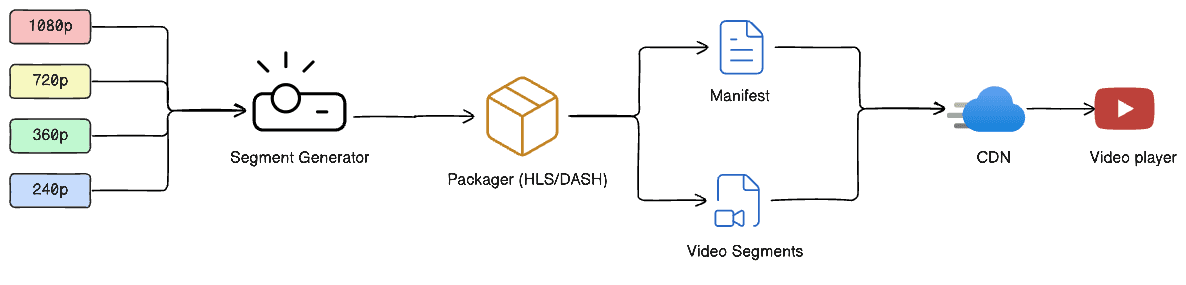
Overview of the ABR streaming pipeline, from ingestion to playback
Let's go a bit deeper into the manifest file. There are two levels of it:
- Master manifest — stores which quality versions of the video are available.
- Media manifest — stores the segments for one specific quality: when each segment starts and how long it runs.
Example master manifest (HLS)
#EXTM3U

#EXT-X-STREAM-INF:BANDWIDTH=800000,RESOLUTION=640x360
360p/index.m3u8

#EXT-X-STREAM-INF:BANDWIDTH=1400000,RESOLUTION=854x480
480p/index.m3u8

#EXT-X-STREAM-INF:BANDWIDTH=2800000,RESOLUTION=1280x720
720p/index.m3u8

#EXT-X-STREAM-INF:BANDWIDTH=5000000,RESOLUTION=1920x1080
1080p/index.m3u8
Example media manifest (HLS)
#EXTM3U

#EXT-X-TARGETDURATION:6

#EXTINF:6.0,
segment001.ts

#EXTINF:6.0,
segment002.ts

#EXTINF:6.0,
segment003.ts
The flow looks like: Master playlist → 720p playlist → segment001.ts → segment002.ts → segment003.ts. That's how a player knows where and how to fetch chunks of a video.
But the player still needs a strategy for which chunks to grab. There are a couple of well-known algorithms for that:
-
Throughput-based adaptation — the player estimates how fast the network currently is, based on the most recently observed throughput. For example: if a 6 MB segment took 3 seconds to download, throughput is 6 MB / 3 s ≈ 2 MB/s ≈ 16 Mbps. Using that estimate, the player predicts available bandwidth and picks the highest rendition it can safely download before playback catches up to the buffer. In short: estimate throughput → apply a safety margin → choose the highest bitrate below that estimate → download the next segment.
-
Buffer-based adaptation (BOLA) — instead of asking how fast the network is, the player asks how much playable video it already has sitting in the buffer. A simplified version of the thinking:
- Buffer almost empty → reduce quality aggressively
- Buffer moderately full → stay at current quality
- Buffer comfortably full → increase quality gradually
This makes playback much more stable, since brief network fluctuations don't immediately trigger a quality change. To be clear, this three-tier framing is just the general idea — BOLA (one real implementation of buffer-based adaptation) actually uses a more rigorous mathematical model under the hood rather than fixed rules like these. In practice, modern players rarely rely on a single strategy; most use a hybrid approach that weighs several signals at once.
Making the Switch Seamless
We now understand how a player decides when to change quality. But there's one question left: if the player switches from 1080p to 720p mid-playback, wouldn't you notice the glitch?
Say the player is playing 1080p and downloads like this:
1080p:
Segment 1 → Segment 2 → Segment 3 → Segment 4
                ↓
             Switch
                ↓
720p:
Segment 5 → Segment 6
How does the player know exactly where in Segment 5 it's safe to jump in? Here's the thing — a video isn't really a stack of complete images. To save space, most frames only store what changed from the previous frame. This is a delta frame, more formally a P-frame (predicted frame).
Every segment, however, starts with one complete, standalone picture: a keyframe, or I-frame (intra-coded frame). Think of the I-frame as the full photo, and every P-frame after it as holding only the pixels that changed since the last frame.
That's why the player can't just switch on any frame it likes. If it jumped into 720p Segment 5 at, say, the 3rd frame instead of the 1st, that 3rd frame is a P-frame — it only holds the difference from a frame that doesn't even exist in the player's buffer (because that frame belonged to the 1080p stream). The player has nothing to apply that difference to. The result is a broken or frozen frame, or a visible stutter. The switch has to happen at a keyframe: it carries all the information it needs and doesn't depend on any previous frame, so playback can continue safely without the viewer noticing. Encoders technically target a specific kind of keyframe called an IDR frame (Instantaneous Decoder Refresh) for this — a keyframe that also resets the decoder's memory completely, so there's zero chance of it accidentally referencing an old frame from before the switch.
This is also why every segment is built, during encoding, to start with a keyframe. The pattern between two keyframes — one I-frame followed by a run of P-frames — is called a GOP, or Group of Pictures. When a segment is said to be 6 seconds long, that means the encoder set the GOP size to match the segment duration. That guarantees every segment boundary is also a keyframe boundary, across every rendition.
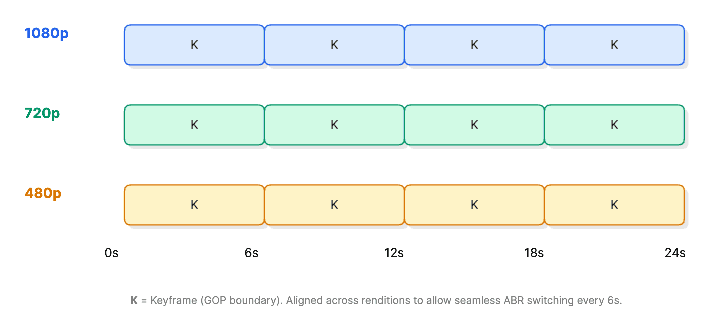
Aligned segment and GOP boundaries across renditions
Back to the example: 1080p Segment 4 and 720p Segment 5 both start their GOP at the exact same timestamp. The player switches at that shared timestamp into the 720p version and keeps playing smoothly.
Conclusion
That's ABR in a nutshell. Small pieces, renditions, manifests, adaptation logic, and keyframes all working together so we don't have to stare at a buffering screen. This covers what I've gathered from digging through different sources — there's more to it, and I'll keep updating this if I get the chance to work deeper in this space.